AI Smart Redact
AI Smart Redact detects and permanently removes sensitive information from PDFs. The service runs entirely within your infrastructure, so no data leaves your environment. AI Smart Redact is built for regulated industries with strict data-sovereignty and compliance requirements: government, financial services, insurance, healthcare, and legal sectors, that require full data sovereignty, provable compliance, and complete auditability.
How smart redaction works
AI Smart Redact processes documents through a four-stage pipeline.
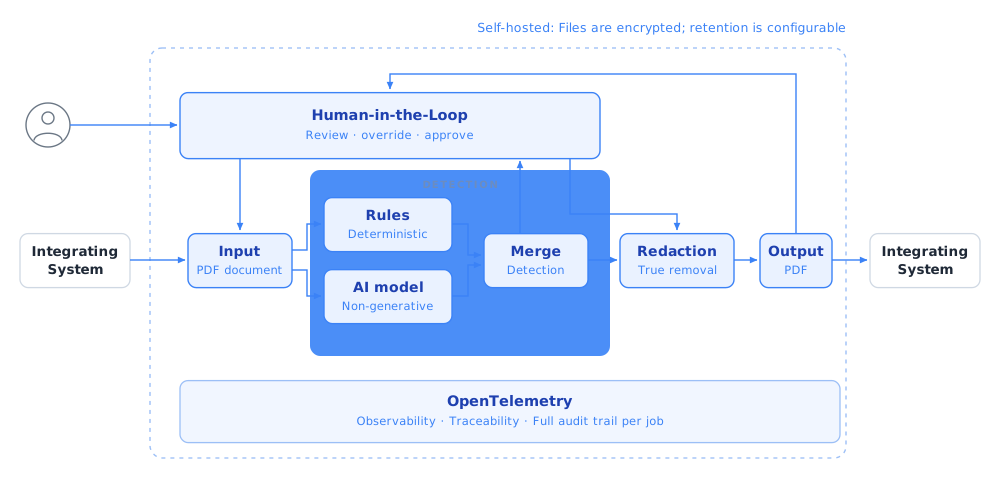
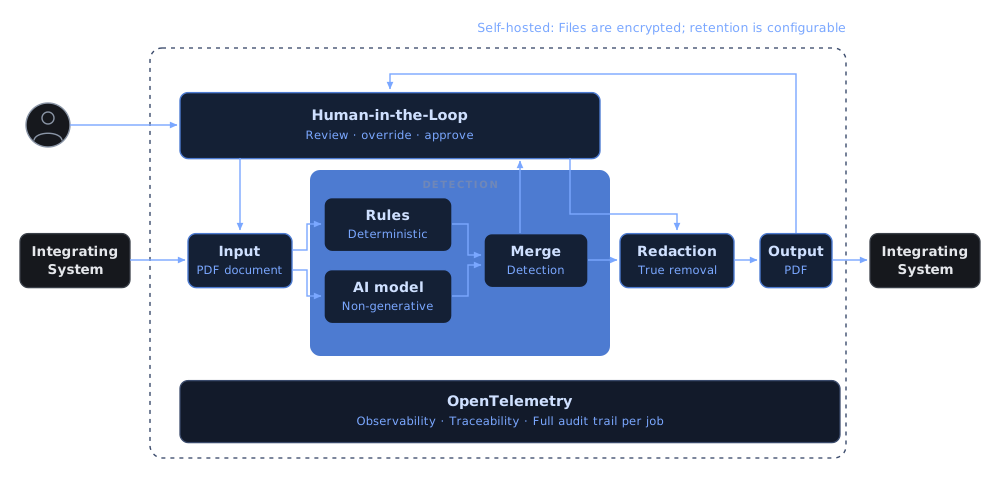
- Input. An integrating system submits a PDF. AI Smart Redact encrypts it immediately.
- Detect. The detection engine identifies personally identifiable information (PII) using a hybrid of an AI model and a deterministic rules engine.
- Review. A reviewer inspects, dismisses, or adds detections, and then approves the set before any redaction is applied.
- Redact. AI Smart Redact creates a new PDF by copying only the visible, approved elements. Hidden content, metadata, and invisible layers don’t carry over.
Detection engine
AI Smart Redact combines two complementary detection approaches:
- AI model. A non-generative Named Entity Recognition (NER) model. It identifies context-dependent entities (people, organizations, addresses) and supports English, German, French, Italian, Spanish, Portuguese, and Dutch. The model works out of the box; no customer data is needed for training. It can’t hallucinate or produce output beyond text in the document.
- Rules engine. A deterministic pattern matcher for structured identifiers: credit card numbers, IBANs, account numbers, case IDs, and other domain-specific patterns. Each match is explainable, and checksum or format validation rejects false-positive matches.
You can extend both: add new PII entity types through configuration, and add new patterns without retraining the model. For the full pipeline and per-method details, refer to Detection.
Key features
AI Smart Redact provides:
- Self-hosted: Deploy in your own infrastructure. License validation is offline. Runtime usage reporting connects to the Pdftools licensing server, or to an on-premise License Gateway Service for air-gapped deployments.
- True redaction: The output PDF contains only visible, approved elements. Hidden content, metadata, and invisible layers don’t carry over.
- Human-in-the-Loop (HITL) review: A reviewer approves every detection before redaction.
- Full audit trail: OpenTelemetry integration provides per-job traceability. Every detection and redaction action is logged for compliance verification.
Data handling
File encryption
AI Smart Redact encrypts each uploaded file at rest using AES-256-GCM with a unique per-file Data Encryption Key (DEK). The Manager doesn’t persist DEK tokens; it returns each token to the integrating system, which holds it. The Orchestrator caches tokens temporarily for the human review workflow only; refer to DEK token storage in the human review workflow. Without the token, the encrypted file is cryptographically unreadable.
DEK token storage in the human review workflow
During human review, the Orchestrator caches each DEK token until the reviewer finishes. Two backends are available:
| Backend | When to use |
|---|---|
| Redis (recommended) | Configure with Redis__ConnectionString on the Orchestrator. Deploy without persistence (no AOF, no RDB) so cached tokens are lost on restart, which is what guarantees crypto-erasure. |
| In-memory (fallback) | Used automatically when Redis__ConnectionString is empty. Single-instance only; tokens don’t survive a restart or scale across replicas. |
Crypto-erasure
Deleting a DEK token makes the corresponding file permanently unrecoverable, even if encrypted blobs remain in backup storage. This supports provable deletion in line with General Data Protection Regulation (GDPR) Art. 5(1)(e) and NIST SP 800-88.
The following scenarios trigger crypto-erasure:
| Scenario | Result |
|---|---|
| Client deletes the DEK token | File is immediately and permanently unrecoverable. |
| DEK token time to live (TTL) expires | Server rejects further operations; file is unrecoverable. |
Client calls DELETE /v1/files/{fileId} | Encrypted blob deleted; token discarded. |
The DEK token design addresses GDPR Art. 5(1)(b,c,e), Art. 30, Art. 32, Art. 35, and NIST SP 800-88.
System requirements
The following table lists the minimum RAM and CPU allocation per service container, with notes on what drives each figure:
| Service | RAM | CPU | Notes |
|---|---|---|---|
| Worker (CPU) | 4 GB | 2 cores | The AI model loads ~2.9 GB into memory at startup. Detection pins one core at 100%. |
| Worker (GPU) | 4 GB+ | 2 cores | GPU inference offloads compute, but the model still loads into RAM. VRAM requirements depend on the GPU. |
| Manager | 1 GB | 2 cores | Baseline ~217 MB. Peaks during file encryption at about two times the file size per concurrent upload. |
| Orchestrator | 1 GB | 2 cores | Similar profile to Manager (proxies uploads, manages sessions). |
| PostgreSQL (per DB) | 512 MB | 1 core | Observed 44-73 MB under load. 512 MB provides headroom for query cache and connection state. |
| RabbitMQ | 512 MB | 1 core | Lightweight for this workload. Increase if queue depths grow large (>10k messages). |
| Redis | 256 MB | 0.5 core | Ephemeral session/token cache only (no persistence). |
Total minimum for the full stack (CPU mode): ~8.5 GB RAM, 9.5 CPU cores (includes two PostgreSQL instances: one for Manager, one for Orchestrator).
A CUDA-compatible GPU is optional but recommended for higher detection throughput at scale. For more details, refer to Scale and Worker configuration.
Containerization
AI Smart Redact ships as Docker images and supports Docker Compose and Kubernetes deployments. For setup steps, review Getting started.
Licensing
AI Smart Redact is licensed per deployment. For setup, review Licensing. To get a license or discuss pricing, contact sales.