
AI Smart Redact: Pdftools Delivers True Redaction for PDF Documents
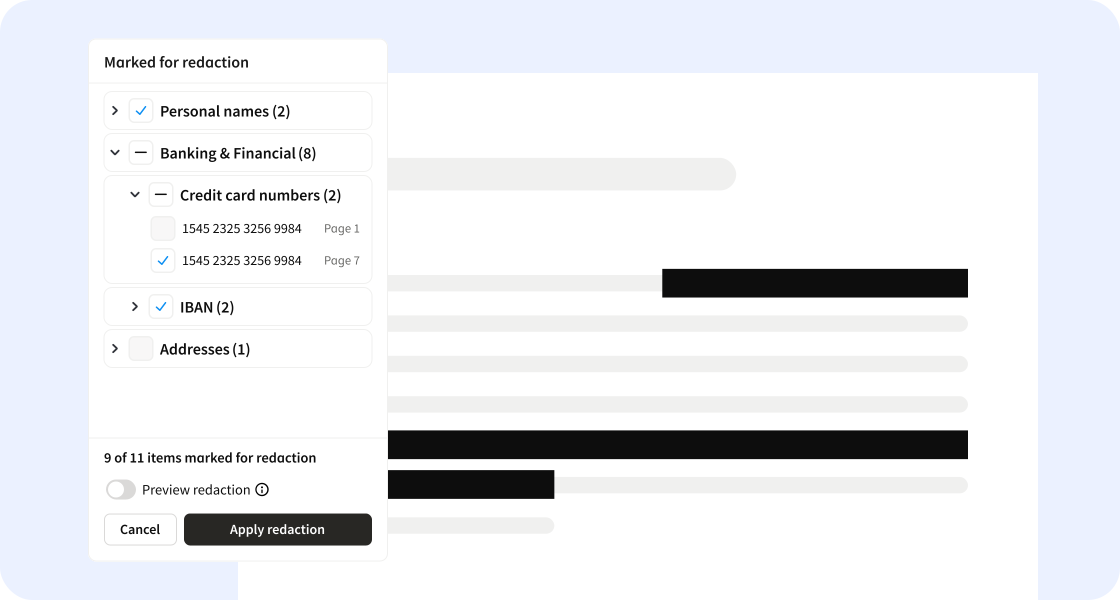
AI Smart Redact combines AI detection with human-in-the-loop reviews. Sensitive information is removed completely, with no residual data, and documents are ready for use with LLMs and other uses.
Faster and more reliable with AI and human-in-the-loop
AI Smart Redact stands out from the competition by bringing the speed of AI detection and the reliability of human decision-making together to create a fast, thorough, and safe process for redacting PII (Personal Identifiable Information) in PDFs at scale.
The detection engine surfaces potential sensitive elements. The authorized reviewer then only has to evaluate already structured redaction recommendations and explicitly approve what should be removed using the Pdftools Viewer as a familiar interface. Reviewers can also manually mark additional elements for redaction using the toolbar.
Once they choose to apply redaction, AI Smart Redact thoroughly removes any residual data and creates a totally sanitised output document, which can then be downloaded or served via API.
The mandatory human-in-the-loop review always ensures clear accountability and compliance.
No generative AI, no hallucinations
The AI model used in AI Smart Redact is a combination of an out-of-the-box stochastic AI model and proprietary deterministic rules created by our team. We use a compact NER (Named Entity Recognition) model, which is a non-generative AI model that comes without the risk of hallucinations, making it far safer for controlled processes handling sensitive information.
But Al alone isn't enough. Neural models can detect patterns, but they can't validate formats. So, in addition to the NER model, deterministic detection can be configured using regular expressions (regex). Customers can customize the engine for their domain by configuring the detection parameters. Combining AI with deterministic validation leads to fewer false positives.
AI Smart Redact achieves an F1 score of up to 98% when benchmarked against the nvidia/Nemotron-PII data set with 50,000 samples. Furthermore, the hybrid approach boosts precision by nearly 10 percentage points when compared to a GLiNER-only approach on the same 17 labels.
Customize detection without retraining
AI Smart Redact has 36 built-in entity types. 32 of them are pattern-based, such as email address, credit card number, alphanumeric code, etc. And four semantic types: person, organisation, physical address, and username.
Add specific keywords to be marked for redaction—or to never be marked for redaction, and change or add detection languages. AI Smart Redact currently supports English, German, French, Italian, Spanish, Portuguese, and Dutch.
Further customization is possible by adding entity types. This is possible without retraining the model, as the semantic engine can parse information such as “nationality” and mark information such as “Swiss” or “American” for redaction.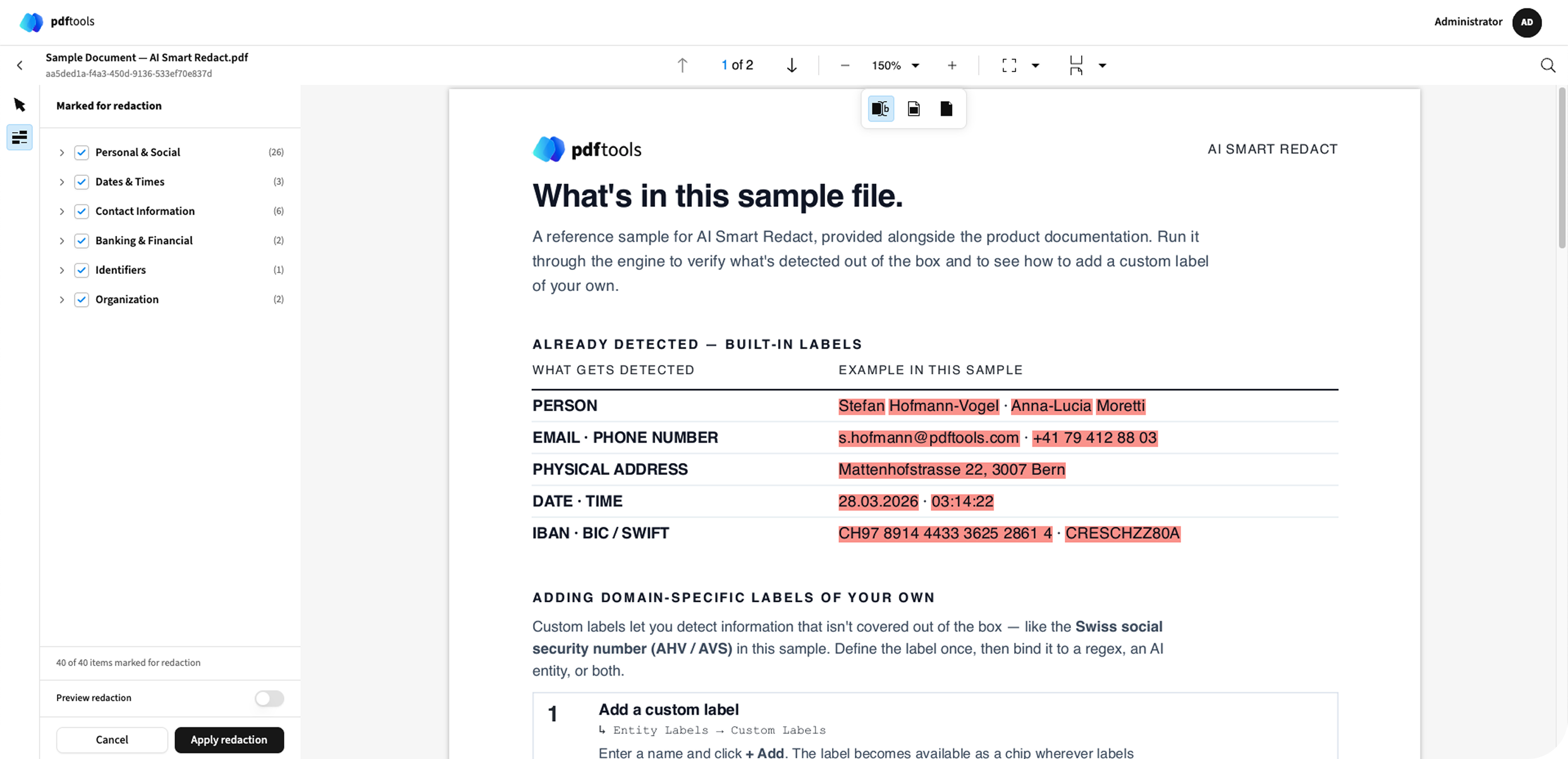
100% impossible to de-redact
Many tools that claim to redact PDFs actually just mask sensitive elements by putting a black box over them. Or they remove the obvious visible top layer and forget about the many types of invisible information in PDFs. Very often, it’s possible to de-redact these documents, and that’s not a secure enough process for businesses and organisations that operate in highly regulated industries.
AI Smart Redact creates true redaction, rather than just masking sensitive data, by completely rebuilding the PDF from scratch. Only explicitly understood elements are copied into the new document. By generating a new, structurally clean PDF, we ensure no hidden text layers, metadata, or recoverable content remains.
Self-hosted for security
AI Smart Redact is fully self-hosted using Docker images. Deploy on-premise and even air-gapped. Using your own infrastructure gives you full control to avoid sending sensitive documents to external cloud services.
Use AI Smart Redact as a standalone solution or integrate it into an existing workflow. Input and output remain entirely agnostic through APIs and a manual upload option.
Use cases for AI Smart Redact
The ability to redact large numbers of documents quickly and reliably is important for many companies in insurance, banking, government, and other industries that handle sensitive information in their day-to-day.
Insurance companies often have to remove PII from internal documents that have to be shared externally. For example, an insured customer could request information about the status of an insurance case regarding one of their employees. But prior to sharing relevant documents, the insurance provider will have to remove any information about said employee that’s considered sensitive and personal.
A teaching hospital can remove any personal information in patient files or perhaps even swap it out for fake patient names to provide students with training materials that reflect real cases without breaking patients’ privacy.
And of course, one of the major use cases for AI Smart Redact is to neutralise documents to prepare them for LLMs and RAG (retrieval-augmented generation). When training generative AI, it’s imperative to first remove sensitive information to make absolutely sure none of it makes it into the training set.
Ready to take document redaction to the next level?
AI Smart Redact is priced per seat, plus a page-based pricing for AI consumption. With AI Smart Redact, you also get full access to the Pdftools Viewer, which has a wide range of other features to help you edit, annotate, and manipulate PDFs.
If you already use the Viewer and want to unlock AI Smart Redact, please get in touch with your customer service manager to get a license.
Try AI Smart Redact now with a trial license
Step 1. Get a trial license
Visit the Pdftools Portal and click on the “See product” button under “AI Smart Redact” to activate a trial license key.
Step 2. Clone the samples repo
git clone https://github.com/pdf-tools/smart-redact-samples.git
cd smart-redact-samples/docker-compose/cpu
Step 3. Configure environment
cp .env.example .envSet your license key and generate two secrets; the commands for generating the secrets can be found in the environment file comments:
PDFTOOLS_LICENSE_KEY: your trial license key generated in step 1
ENCRYPTION_KEY: generate file encryption key
ORCHESTRATOR_JWT_SECRET: generate JWT signing secret
Step 4. Configure environment
This pulls the images and starts all containers. Make sure you have Docker installed on your machine.
docker compose up -d
Step 5. Open the HiTL app
Go to http://localhost:3000, log in with admin@example.com / Admin1234, then upload, detect, review, and apply redaction.
For more detailed instructions, please go to our AI Smart Redact Readme on GitHub.