.NET interface changes for PDF Toolbox SDK
There are several changes in naming and behavior in the .NET interface to bear in mind when migrating from the 3-Heights® PDF Toolbox API to the PDF Toolbox SDK.
This page provides the changes between the two products only. For full reference information on the PDF Toolbox SDK, see .NET API reference.
Namespaces
The company namespace of PDF Tools AG is PdfTools, both in 3-Heights® PDF Toolbox API and in PDF Toolbox SDK. In 3-Heights®, most interface elements reside in the namespace PdfTools.Pdf, except for the following type,which reside directly in PdfTools:
- Point
- Rectangle
- Size
- ErrorCode
- ErrorCodeException
PDF Toolbox SDK introduces the following new namespaces:
| Namespace | Area of usage |
|---|---|
PdfTools.FourHeights.PdfToolbox | Base namespace |
PdfTools.FourHeights.PdfToolbox.Geometry | Geometric related |
PdfTools.FourHeights.PdfToolbox.Geometry.Real | For floating point numbers |
PdfTools.FourHeights.PdfToolbox.Geometry.Integer | For integer numbers |
PdfTools.FourHeights.PdfToolbox.Pdf | General PDF related |
PdfTools.FourHeights.PdfToolbox.Pdf.Annotations | Annotation related |
PdfTools.FourHeights.PdfToolbox.Pdf.Content | Page content related |
PdfTools.FourHeights.PdfToolbox.Pdf.Forms | Form field related |
PdfTools.FourHeights.PdfToolbox.Pdf.Navigation | Document navigation related |
The Sdk class
License keys and product version
In 3-Heights®, the public properties LicenseKey and ProductVersion of the common base class Internal.NativeObject allows setting a license key and querying the version of the API.
In PDF Toolbox SDK, this functionality has been moved to the class Sdk. Specifically:
Sdk.Initializemust be called to set a license key. See also License keys.Sdk.Versiongets the API’s version number as a string.
The PDF Producer entry
In 3-Heights® PDF Toolbox API, when creating a PDF, the Metadata object sets the PDF’s Producer entry via the property Metadata.Producer.
In PDF Toolbox SDK, the class Pdf.Metadata has no setter for the Producer property. Instead, the Producer entry for all output PDFs is preconfigured as a string consisting of two parts:
- The first part (the “base” part) is encodesd in the license key. Hence, this part is determined when buying a licensefrom Pdftools.
- The second part (the “suffix” part) is configured when calling
Sdk.Initializeas an argument. It is recommended to use the suffix solely for version information. The assembled “Producer” entry can be obtained after callingSdk.Initializeusing the propertySdk.ProducerFullName.
Removal of IDisposable implementation
In PDF Toolbox SDK, the implementation of the IDisposable interface has been removed from all but the following classes:
DocumentContentGeneratorTextGenerator
Native resources are now released automatically when getting or appending a page.
Value types
In 3-Heights® PDF Toolbox API, interface elements documented as “struct” are actually classes (class), i.e. reference types.
In PDF Toolbox SDK, interface elements documented as “struct” are value types (struct). This affects the following existing interface elements:
PointSizeRectangleTransformationPageDisplay
and following new interface element:
Geometry.Integer.Size
As a consequence, the above types don’t have a constructor and all fields are default constructed. See also Affine transform objects should be initialized.
Exceptions
In PDF Toolbox SDK, the ErrorCodeException has been renamed to PdfToolboxException. The property ErrorCodeException.Code has been removed and substituted by the following new classes, each extending PdfToolboxException:
ConformanceExceptionCorruptExceptionLicenseExceptionPasswordExceptionUnknownFormatExceptionUnsupportedFeatureException
Instead of an ErrorCodeException with property ErrorCodeException.ErrorCodeErrorCode.IO, a System.IO.IOException is generated.
Renaming
Some interface elements have been renamed. The following principles apply:
- Interface elements that include abbreviations are now written consistently in Pascal case. For example
RGB→ is nowRgb, except for two-letter abbreviations, which are written as two capital letters, such asIO. - Some abbreviations have been changed to full words, for example
Char→Character. - Some words that are repeated in the introduced namespace have been dropped. For example,
AnnotationPopup→ is nowPdf.Annotations.Popup. - Improved clarity, brevity, jargon, and technical correctness.
Affine transform objects should be initialized
In 3-Heights® PDF Toolbox API, Transformation is a class.
In PDF Toolbox SDK, this element has been renamed to Geometry.Real.AffineTransformation, and its type has changed to struct (See Value types).
Specifically, default constructed Geometry.Real.AffineTransform objects are not valid. (A matrix with all values 0 is singular.) Default constructed Geometry.Real.AffineTransform objects should always be initialized with Geometry.Real.AffineTransform.Identity. For example:
AffineTransform transform = AffineTransform.Identity;
Creation and copying methods
In 3-Heights® PDF Toolbox API, most document-associated objects are created in an output document by static methods Document.Create... and copied from an input document to an output document by static methods Document.Copy..., e.g. Document.CreatePage, Document.CopyPage.
In PDF Toolbox SDK, all these methods have been moved from the Document class to the class that is created or copied. For example, method Document.CreatePage → Pdf.Page.Create.
This affects the following classes:
PageImageImageMaskFontGroupColorSpacePaintTextMetadataFileReferenceSubFormGeneralTextFieldCombTextFieldCheckBoxFieldRadioButtonFieldListBoxFieldComboBoxFieldNamedDestinationOutlineItemAnnotationLinkFileAttachmentAnnotationFreeTextAnnotationStickyNoteAnnotationTextStampAnnotationCustomStampAnnotationCircleAnnotationSquareAnnotationLineAnnotationPolyLineAnnotationPolygonAnnotationFreeDrawingAnnotationContentElementFormFieldNode
Constructors
In 3-Heights® PDF Toolbox API, some document-associated objects are created by means of a constructor. E.g. FitPageDestination.FitPageDestination.
In PDF Toolbox SDK, most of these document-associated objects are now created and copied with static methods Create and Copy.
This affects the following classes:
EmbeddedPdfLinkFitHeightDestinationFitPageDestinationFitRectangleDestinationFitWidthDestinationLocationZoomDestinationWebLink
In PDF Toolbox SDK, the following classes (most of them not document-associated) have constructors:
Pdf.EncryptionPdf.Content.ContentExtractorPdf.Content.ContentGeneratorPdf.Content.FillPdf.Content.PageCopyOptionsPdf.Content.PathGeneratorPdf.Content.PathPdf.Content.StrokePdf.Content.TextGeneratorPdf.Content.TransparencyPdf.Navigation.OutlineCopyOptions
Unknown PDF conformance
In 3-Heights® PDF Toolbox API, the Conformance enumeration has a value Conformance.Unknown.
The PDF Toolbox SDK enum Pdf.Conformance has no such value. The handling of unknown (i.e. automatically upgrading) PDF conformance is now done as follows:
- In the method
Pdf.Document.Create, the type of the second argument has changed fromConformancetoPdf.Conformance?, where anullvalue has the same meaning as the removed valueConformance.Unknown. - The property
Pdf.Document.Conformancealways returns the current conformance. For input documents, this is the claimed conformance. For output documents, this is either the explicit conformance set when creating or (if created withnull) the conformance the output PDF would have if closed now.
Copy options
In 3-Heights® PDF Toolbox API, page copying and outline copying behavior is configurable by means of the CopyOption enum.
In PDF Toolbox SDK, this enum has been substituted by new classes:
Pdf.PageCopyOptionsUsedin methodsPdf.Page.CopyandPdf.Group.CreateFromPage.Pdf.Navigation.OutlineCopyOptionsUsedin methodPdf.Navigation.OutlineItem.Copy.
Each copying configuration decision is reflected in a class member. Apart from Boolean for on-off decisions, the following enumerations model possible choices:
Pdf.CopyStrategyPdf.RemovalStrategyPdf.NameConflictResolutionPdf.Forms.FormFieldCopyStrategyPdf.Navigation.NamedDestinationCopyStrategy
This clarifies the copying behavior and allows sensible default values.
Color space classes
Class hierarchy
In 3-Heights® PDF Toolbox API, there is a single class ColorSpace, which covers all types of color spaces.
In PDF Toolbox SDK, the ColorSpaceType enumeration and the property ColorSpace.Type have been removed. Instead, there are the following new classes, all extending Pdf.Content.ColorSpace:
Pdf.Content.CalibratedGrayColorSpacePdf.Content.CalibratedRgbColorSpacePdf.Content.DeviceCmykColorSpacePdf.Content.DeviceGrayColorSpacePdf.Content.DeviceRgbColorSpacePdf.Content.IccBasedColorSpacePdf.Content.IndexedColorSpacePdf.Content.LabColorSpacePdf.Content.NChannelColorSpacePdf.Content.SeparationColorSpace
The 3-Heights® PDF Toolbox API color space type DeviceN now is subsumed by the more general Pdf.Content.NChannelColorSpace.
Device color spaces versus process color spaces
In 3-Heights® PDF Toolbox API, the method Document.CreateDeviceColorSpace does not necessarily create a device color space, e.g., in case of PDF/A.
In PDF Toolbox SDK, the enumeration DeviceColorSpaceType has been renamed to Pdf.Content.ProcessColorSpaceType. The class Pdf.Content.ColorSpace now has the following static method:
Pdf.Content.ColorSpace CreateProcessColorSpace(Pdf.Document targetDocument, Pdf.Content.DeviceColorSpaceType type)
This method creates either a device color space, or, in case of PDF/A, a calibrated (grayscale or RGB) or an ICC-based (CMYK) color space.
Embedded/Associated/Attached files
In 3-Heights® PDF Toolbox API, embedded files, associated files, and files contained in a FileAttachmentAnnotation are jointlylisted in the property Document.EmbeddedFiles.
In PDF Toolbox SDK, embedded files, associated files, and files contained in file attachment annotations are treated separately. A Pdf.Document now has two lists for appending:
Pdf.Document.AssociatedFilesPdf.Document.PlainEmbeddedFiles
The former property Document.EmbeddedFiles has been renamed to Pdf.Document.AllEmbeddedFiles, a read-only list that contains embedded files and files contained in Pdf.Annotations.FileAttachment annotations. This list is equivalent to what a viewer normally lists in an embedded files pane,. For example, the “Attachments” pane in the Adobe PDF viewer.
Annotations
In PDF Toolbox SDK, the following annotation classes have been renamed for technical correctness:
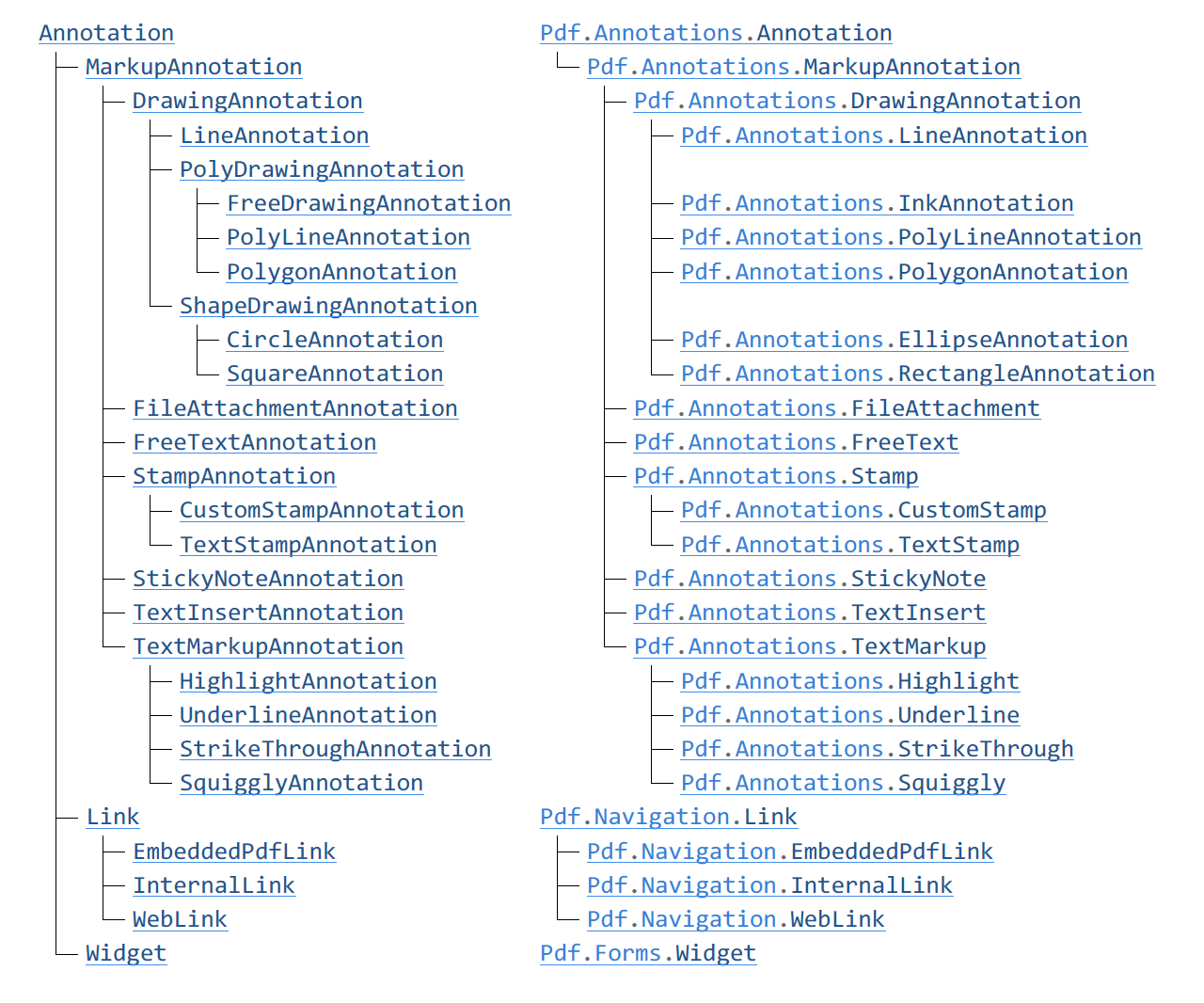
FreeDrawingAnnotation→Pdf.Annotations.InkAnnotationCircleAnnotation→Pdf.Annotations.EllipseAnnotationSquareAnnotation→Pdf.Annotations.RectangleAnnotation
The property RadioButtenField.CanToggleOff has been removed. In most PDF viewers, there is no support for this feature.
Class hierarchy
In 3-Heights® PDF Toolbox API, WidgetandLink extend the base class Annotation. In PDF Toolbox SDK, the classes Pdf.Forms.Widget and Pdf.Navigation.Link have been separated from their former base class. Due to this separation:
A Pdf.Page now has the following lists:
Pdf.Page.AnnotationsPdf.Page.LinksPdf.Page.FormFieldWidgets
The following properties of Pdf.Annotations.Annotation have been replicated in Pdf.Forms.Widget and Pdf.Navigation.Link:
BoundingBoxHiddenNoPrintThe intermediate base classesPolyDrawingAnnotationandShapeDrawingAnnotationhave been removed. All drawing annotations now directly extend the classPdf.Annotations.DrawingAnnotation.Those drawing annotations that have a closed path (Pdf.Annotations.PolygonAnnotation,Pdf.Annotations.EllipseAnnotation,Pdf.Annotations.RectangleAnnotation) have a propertyFill.
Class hierarchy comparison
| 3-Heights® PDF Toolbox (left) | PDF Toolbox SDK (right) |
|---|
MaxLength in text fields
In 3-Heights® PDF Toolbox API, the error behavior of the property TextField.MaxLength depends on the actual underlying class: GeneralTextField allows null values, while CombTextField does not.
In PDF Toolbox SDK, the property TextField.MaxLength has been removed and replicated in the derived classes Pdf.Forms.CombTextField and Pdf.Forms.GeneralTextField, in the latter as a nullable int?.
Unified paint creation
In 3-Heights® PDF Toolbox API, there exist three methods for creating a Paint object:
Document.CreateSolidPaintDocument.CreateAlphaPaintDocument.CreateBlendingPaint
In PDF Toolbox SDK, these methods have been replaced by a single static method Pdf.Content.Paint.Create. See also Creation and copying methods.
Separate inside rule from path
In 3-Heights® PDF Toolbox API, the constructor Path.Path has an argument InsideRule rule.
In PDF Toolbox SDK, this argument is dropped. Instead, the InsideRule now is specified in a new member of Pdf.Content.Fill when painting the path with Pdf.Content.ContentGenerator.PaintPath, or it is specified ina method argument when clipping with Pdf.Content.ContentGenerator.ClipWithPath. This removes ambiguity and allows a separated treatment of the inside rule for path filling and path clipping.
Path and text clipping operations
In 3-Heights® PDF Toolbox API, the ContentGenerator supports simultaneous clipping and painting operations.
In PDF Toolbox SDK, path and text clipping operations have been separated from path and text painting operations as follows:
The argument bool intersectClipPath has been removed from the method ContentGenerator.PaintPath.
The method TextGenerator.SetRendering has been removed (see also Text generator), and its argument bool intersectClipping has been dropped without a replacement.
The new class Pdf.Content.ContentGenerator has two new methods for path and text clipping operations:
Pdf.Content.ContentGenerator.ClipWithPathPdf.Content.ContentGenerator.ClipWithText
To achieve the same effect of simultaneous clipping and painting, the painting operation has to precede the clipping operation.
Text generator
In PDF Toolbox SDK, the method TextGenerator.SetRendering has been substituted by two separate properties:
Pdf.Content.TextGenerator.FillPdf.Content.TextGenerator.Stroke
Image size and image mask size
In 3-Heights® PDF Toolbox API, Imageand ImageMask have properties Width and Height.
In PDF Toolbox SDK, these are substituted by properties Pdf.Content.Image.Size and Pdf.Content.ImageMask.Size, both of which have the new type Geometry.Integer.Size.
Reference
For all changes in the .NET interface between 3-Heights® PDF Toolbox API and the PDF Toolbox SDK, see .NET Reference.