Parameters
Pdftools OCR Service lets you fine-tune the OCR engine through parameters that influence performance, layout detection, output quality, and preprocessing steps. You can set these engine parameters as a sequence of key and value pairs separated by a semicolon (;) in the Conversion Service Configurator OCR settings.
General settings
PredefinedProfile
| Key | Type | Default |
|---|---|---|
PredefinedProfile | Name | Default |
Selects a predefined recognition profile. Each profile provides optimized OCR settings for a specific use case.
| Profile name | Purpose |
|---|---|
DataExtraction | Captures all content from a document in a structured format, including tables, images, checkmarks, handwriting, and stamps. |
DocumentConversion_Accuracy | Converts documents into editable formats with the highest quality. Detects font styles and fully reconstructs the logical document structure. |
DocumentConversion_Normal | Converts documents into editable formats with faster processing. Detects font styles and reconstructs document structure, but skips orientation correction. |
DocumentArchiving_Accuracy | Creates searchable PDF/PDF/A archives with maximum text coverage. Focuses on accuracy without reconstructing the full document structure. |
DocumentArchiving_Speed | Creates searchable PDF/PDF/A archives with maximum throughput. Trades accuracy for faster processing. |
TextExtraction_Accuracy | Extracts text from documents with high accuracy, including small and low-quality text areas. Doesn’t detect images or tables. |
TextExtraction_Speed | Extracts text from documents with maximum throughput. Trades accuracy for faster processing. |
FieldLevelRecognition | Recognizes short, isolated text fragments such as form fields or single lines. |
BarcodeRecognition_Accuracy | Detects and reads barcodes with high accuracy. All other content types (text, images, tables) are ignored. |
BarcodeRecognition_Speed | Detects and reads barcodes with maximum throughput. All other content types (text, images, tables) are ignored. |
HighCompressedImageOnlyPdf | Produces highly compressed PDF files where each page is stored as an image. No text recognition is performed. |
BusinessCardsProcessing | Recognizes and extracts structured data from business cards. |
MachineReadableZone | Reads machine-readable zone (MRZ) data from identity documents. Extracts all text on the image and performs automatic resolution and geometry correction. |
EngineeringDrawingsProcessing | Recognizes text in technical drawings, engineering diagrams, and schematics. Handles large images and multiple text orientations, producing searchable PDF output. |
Default | General-purpose profile that uses default values for all processing parameters. |
DataExtraction
Captures all content from a document in a structured format:
- Identifies all object types: tables, images, checkmarks, handwriting, and stamps.
- Uses accurate recognition mode for maximum quality.
This profile corresponds to the following parameters:1
[PageAnalysisParams]
AnalysisMode = PAM_TextExtraction
SpeedQualityMode = SQM_Accurate
DetectBarcodes = true
DetectPictures = true
DetectTables = true
DetectHandwritten = true
DetectCheckmarks = true
DetectStamps = true
DetectTextOnPictures = true
DetectVerticalEuropeanText = true

[RecognizerParams]
Mode = RM_Accurate
TextTypes = TT_Normal | TT_Handwritten

[SynthesisParamsForDocument]
DetectDocumentStructure = true
DocumentConversion_Accuracy
Converts documents into editable formats, optimized for accuracy:
- Detects font styles (bold, italic, font size) and fully reconstructs the logical document structure (headings, lists, table of contents).
This profile corresponds to the following parameters:
[PageAnalysisParams]
AnalysisMode = PAM_DocumentConversion
SpeedQualityMode = SQM_Accurate
DetectBarcodes = true
DetectPictures = true
DetectTables = true
DetectHandwritten = false
DetectVerticalEuropeanText = true

[RecognizerParams]
Mode = RM_Accurate
TextTypes = TT_Normal

[SynthesisParamsForDocument]
DetectDocumentStructure = true
DetectFontFormatting = true
DocumentConversion_Normal
Converts documents into editable formats, optimized for processing speed:
- Detects font styles and reconstructs the logical document structure.
- Skips image orientation correction to save time.
- Uses fast analysis and normal recognition mode.
This profile corresponds to the following parameters:
[PagePreprocessingParams]
CorrectOrientationMode = COM_No
CorrectSkewMode = CSM_Fast

[PageAnalysisParams]
AnalysisMode = PAM_DocumentConversion
SpeedQualityMode = SQM_Fast
DetectBarcodes = false
DetectPictures = true
DetectTables = true
DetectHandwritten = false
DetectVerticalEuropeanText = true

[RecognizerParams]
Mode = RM_Normal
TextTypes = TT_Normal

[SynthesisParamsForDocument]
DetectDocumentStructure = true
DetectFontFormatting = true
DocumentArchiving_Accuracy
Creates searchable PDF/PDF/A archives, optimized for accuracy:
- Maximizes text coverage, including text embedded in images.
- Doesn’t reconstruct the logical document structure or detect font styles.
This profile corresponds to the following parameters:
[PageAnalysisParams]
AnalysisMode = PAM_TextExtraction
SpeedQualityMode = SQM_Accurate
DetectBarcodes = true
DetectPictures = true
DetectTables = false
DetectHandwritten = false
DetectVerticalEuropeanText = true

[RecognizerParams]
Mode = RM_Accurate

[SynthesisParamsForDocument]
DetectDocumentStructure = false
DetectFontFormatting = false

[SynthesisParamsForPage]
DetectFontFormattingAtPageLevel = true
DetectTextColor = TSPV_No
DetectBackgroundColor = TSPV_No
DocumentArchiving_Speed
Creates searchable PDF/PDF/A archives, optimized for speed:
- Same goals as
DocumentArchiving_Accuracy, but uses fast binarization, skips orientation correction and skew correction, and disables image, table, and barcode detection.
This profile corresponds to the following parameters:
[ObjectsExtractionParams]
FastObjectsExtraction = true
ProhibitColorImage = true

[PagePreprocessingParams]
UseFastBinarization = true
CorrectOrientationMode = COM_No
CorrectSkewMode = CSM_Fast
CropImage = TSPV_No
DetectImageType = TSPV_No
StraightenLinesMode = SLM_Fast

[PageAnalysisParams]
AnalysisMode = PAM_TextExtraction
SpeedQualityMode = SQM_Fast
DetectBarcodes = false
DetectPictures = false
DetectTables = false
DetectHandwritten = false
DetectVerticalEuropeanText = false

[RecognizerParams]
Mode = RM_Fast

[SynthesisParamsForDocument]
DetectDocumentStructure = false
DetectFontFormatting = false

[SynthesisParamsForPage]
DetectFontFormattingAtPageLevel = true
DetectTextColor = TSPV_No
DetectBackgroundColor = TSPV_No
TextExtraction_Accuracy
Extracts text from documents, optimized for accuracy:
- Finds all text on the page, including small and low-quality text areas. Images and tables aren’t detected.
- Doesn’t reconstruct the full logical document structure.
This profile corresponds to the following parameters:
[PageAnalysisParams]
AnalysisMode = PAM_TextExtraction
SpeedQualityMode = SQM_Accurate
DetectBarcodes = true
DetectPictures = false
DetectTables = false
DetectVectorGraphics = false
DetectHandwritten = false
DetectSeparators = true
DetectCheckmarks = false
DetectStamps = false
DetectTextOnPictures = false
DetectVerticalEuropeanText = true

[RecognizerParams]
Mode = RM_Accurate

[SynthesisParamsForDocument]
DetectDocumentStructure = true
DetectFontFormatting = false

[SynthesisParamsForPage]
DetectFontFormattingAtPageLevel = true
DetectTextColor = TSPV_No
DetectBackgroundColor = TSPV_No
TextExtraction_Speed
Extracts text from documents, optimized for speed:
- Same goals as
TextExtraction_Accuracy, but uses fast binarization, skips orientation correction, and discards color image data.
This profile corresponds to the following parameters:
[ObjectsExtractionParams]
FastObjectsExtraction = true
ProhibitColorImage = false

[PagePreprocessingParams]
UseFastBinarization = true
DiscardColorImage = true
CorrectOrientationMode = COM_No

[PageAnalysisParams]
AnalysisMode = PAM_TextExtraction
SpeedQualityMode = SQM_Fast
DetectBarcodes = false
DetectPictures = false
DetectTables = false
DetectVectorGraphics = false
DetectHandwritten = false
DetectSeparators = true
DetectCheckmarks = false
DetectStamps = false
DetectTextOnPictures = false
DetectVerticalEuropeanText = true

[RecognizerParams]
Mode = RM_Fast

[SynthesisParamsForDocument]
DetectDocumentStructure = false
DetectFontFormatting = false

[SynthesisParamsForPage]
DetectFontFormattingAtPageLevel = true
DetectTextColor = TSPV_No
DetectBackgroundColor = TSPV_No
FieldLevelRecognition
Recognizes short, isolated text fragments such as form fields or single lines.
This profile corresponds to the following parameters:
[DocumentProcessingParams]
PerformSynthesis = false

[PageProcessingParams]
PerformAnalysis = false

[RecognizerParams]
Mode = RM_Accurate

[SynthesisParamsForPage]
DetectFontFormattingAtPageLevel = false
BarcodeRecognition_Accuracy
Detects and reads barcodes, optimized for accuracy:
- Only processes barcodes—text, images, and tables are ignored.
This profile corresponds to the following parameters:
[ObjectsExtractionParams]
DetectMatrixPrinter = false
DetectPorousText = false

[PageAnalysisParams]
DetectBarcodes = true
DetectPictures = false
DetectTables = false
DetectText = false
DetectSeparators = false
DetectVectorGraphics = false

[PagePreprocessingParams]
CorrectSkewMode = CSM_Off
BarcodeRecognition_Speed
Detects and reads barcodes, optimized for speed:
- Same goals as
BarcodeRecognition_Accuracy, but uses fast object extraction, discards color image data, and skips preprocessing.
This profile corresponds to the following parameters:
[ObjectsExtractionParams]
DetectMatrixPrinter = false
DetectPorousText = false
FastObjectsExtraction = true

[PageAnalysisParams]
DetectBarcodes = true
DetectPictures = false
DetectTables = false
DetectText = false
DetectSeparators = false
DetectVectorGraphics = false

[PagePreprocessingParams]
CorrectSkewMode = CSM_Off
DiscardColorImage = true
StraightenLinesMode = SLM_Fast

[PageProcessingParams]
PerformPreprocessing = false
HighCompressedImageOnlyPdf
Produces highly compressed image-only PDF files:
- No text recognition or document structure analysis is performed.
- Skew correction is turned off.
- PDF export targets the smallest possible file size.
- Each page is stored as a compressed image.
This profile corresponds to the following parameters:
[DocumentProcessingParams]
PerformSynthesis = false

[ObjectsExtractionParams]
ProhibitColorImage = true

[PageAnalysisParams]
CollectPdfExportData = true
AnalysisMode = PAM_TextOnly

[PageProcessingParams]
PerformRecognition = false

[PDFExportParams]
Scenario = PES_MinSize
TextExportMode = PEM_ImageOnly

[PagePreprocessingParams]
CorrectSkewMode = CSM_Off
BusinessCardsProcessing
Recognizes and extracts structured data from business cards:
- Focuses on business card content—images and tables aren’t detected.
- Uses aggressive text extraction to capture small and low-quality text.
- Applies resolution correction automatically.
- Doesn’t reconstruct the logical document structure.
This profile corresponds to the following parameters:
[ObjectsExtractionParams]
EnableAggressiveTextExtraction = true
ProhibitColorImage = false

[PageAnalysisParams]
PageObjectsUsageMode = POUM_BCR

[PrepareImageMode]
DocumentType = DT_BusinessCard

[SynthesisParamsForDocument]
DetectDocumentStructure = false

[SynthesisParamsForPage]
SynthesizeBusinessCards = true
MachineReadableZone
Reads machine-readable zone (MRZ) data from identity documents:
- Extracts all text on the page while ignoring images, vector graphics, and tables.
- Automatically corrects resolution and geometry to handle varied scan quality.
This profile corresponds to the following parameters:
[PagePreprocessingParams]
CorrectGeometry = TSPV_Auto
CorrectOrientationMode = COM_Auto
CorrectSkewMode = CSM_Auto
OverwriteResolutionMode = ORM_Auto

[PageAnalysisParams]
AnalysisMode = PAM_TextOnly
DetectPictures = false
DetectSeparators = false
DetectTables = false
DetectText = true
DetectVectorGraphics = false
DetectTextOnPictures = true

[ObjectsExtractionParams]
EnableAggressiveTextExtraction = true
RemoveGarbage = true
RemoveTexture = true

[RecognizerParams]
Mode = RM_Accurate

[SynthesisParamsForDocument]
DetectFontFormatting = true

[DocumentProcessingParams]
PerformSynthesis = true
EngineeringDrawingsProcessing
Recognizes text in technical drawings, engineering diagrams, and schematics:
- Designed for large, complex images where text can appear at any orientation.
- Finds all text on the page, including vertically oriented text blocks.
This profile corresponds to the following parameters:
[PageAnalysisParams]
AnalysisMode = PAM_TextOnly
DetectPictures = false
DetectVectorGraphics = false
DetectVerticalEuropeanText = true

[RecognizerParams]
Mode = RM_Accurate

[FontFormattingDetectionParams]
DetectFontFamily = true
DetectBold = true
DetectFontSize = true

[SynthesisParamsForDocument]
DetectDocumentStructure = false
DetectFontFormatting = false

[SynthesisParamsForPage]
DetectFontFormattingAtPageLevel = true
Default
General-purpose profile:
- Uses default values for all processing parameters.
Profile
| Key | Type |
|---|---|
Profile | Path |
Path to a custom recognition profile INI file.
To configure a custom profile for specific OCR processing behavior, follow these steps:
- Create a custom profile INI file.
- In the Conversion Service Configurator, go to Workflows & Profiles.
- Click the pen icon next to the workflow profile you want to edit.
- Navigate to the OCR Settings section.
- Next to Engine, click the pen icon in the Pdftools OCR Service (3H Legacy Compatible) section.
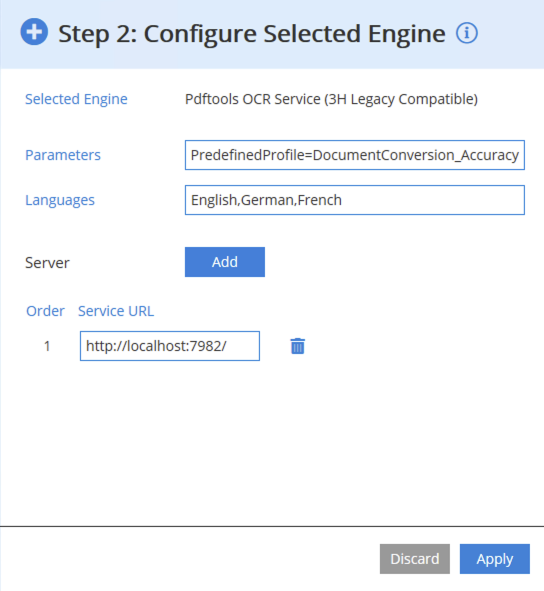
- In the Parameters input field, include a path to your INI file, for example:
Profile="C:\ocr\profiles\document_conversion_high_accuracy.ini" - After editing your configuration, click Apply.
The INI file must be on the same machine as the Pdftools OCR Service Manager node. If both Profile and PredefinedProfile are set, the custom Profile overrides the predefined profile.
For more details about creating your profiles, review Custom Profiles page.
PreprocessingOnly
| Key | Type | Default |
|---|---|---|
PreprocessingOnly | Boolean | false |
When set to true, only image transformations (such as deskewing, resolution correction, and binarization) are applied—no recognition is performed. This is useful for workflows that require cleaned-up images without OCR.
RemoveGarbage
| Key | Type |
|---|---|
RemoveGarbage | Integer |
Remove small, isolated dark regions in bitonal images that are likely scanning noise before any OCR is done. The value defines the maximum area of such noise in pixels. A value of -1 enables automatic determination.
Blank page detection
RecognizeBlankPages
| Key | Type | Default |
|---|---|---|
RecognizeBlankPages | Boolean | false |
Enable automatic skipping of pages that are considered blank. A blank page is a page with uniform coloring and only slight noise. Colored, grayscale, and bitonal pages can be subject to blank page recognition. If a page is skipped as blank, no OCR is performed. The RecognizeBlankPages parameter takes Boolean values true or false.
BlankPageMargin
| Key | Type | Default |
|---|---|---|
BlankPageMargin | Double | 0.02 |
Set the ratio that the margin takes with respect to the corresponding page length. The margin is excluded from the analysis when a page is blank, preventing border artifacts from affecting blank page detection. Allowed values range from 0.0 to 0.5. This parameter is only active if the value of RecognizeBlankPages is set to true.
Output format control
DisableMaskEmbedding
| Key | Type | Default |
|---|---|---|
DisableMaskEmbedding | Boolean | false |
If this option is set to true, no mask is embedded in the output TIFF. When set to false (default), bitonal masks are embedded in the output TIFF or PDF as an image layer. The mask layer is omitted when enabled, and only recognized text is preserved. The DisableMaskEmbedding is useful for output without background images. The DisableMaskEmbedding parameter takes Boolean values true or false.